Privacy Canada is community-supported. We may earn a commission when make a purchase through one of our links. Learn more.
Best Antivirus for Android: Tested Picks for Canadians



Your Android phone holds your banking apps, your email, your photos, and the identity documents you scan and forget about. That makes it a target. The good news is that Android is far better defended than it was a few years ago, and every modern phone ships with free protection already turned on. The harder question is whether you still need a third-party antivirus app on top of that, and if so, which one is worth installing.
This guide answers both questions for a Canadian audience. We lean on current independent lab results from AV-TEST, official Google documentation, and Government of Canada privacy guidance rather than marketing copy. We also flag the privacy track record of the vendors involved, because a security app that mishandles your data is solving one problem while creating another.
Do you actually need antivirus on Android?
For many people the honest answer is “maybe not,” and a good guide should say so. Android already includes a built-in malware scanner, and sensible habits stop the large majority of threats. A paid app earns its place when you want extra features such as anti-theft tools, a VPN, scam-link filtering, or data-breach monitoring, or when you sideload apps from outside the Google Play Store.
What Google Play Protect already does
Every phone with Google Play services includes Google Play Protect, which is on by default. According to Google’s Android Security Help Center, Play Protect scans apps from the Play Store before you download them, periodically checks the apps already on your device, warns you about harmful apps, and can disable or remove them. It also scans apps you install from outside the store if you opt in to sending unknown apps to Google. In other words, you are not starting from zero. You already have a baseline scanner running quietly in the background.
Where built-in protection falls short
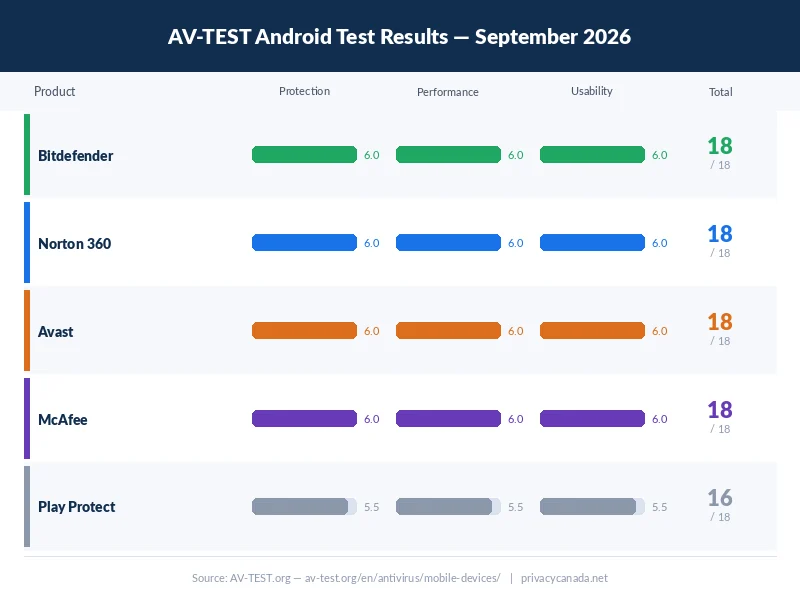
Independent testing shows the gap. In AV-TEST’s September 2026 Android evaluation, Google Play Protect scored 5.5 out of 6 for protection, while most dedicated apps scored a perfect 6. That half-point gap represents real malware samples that slipped past the baseline and were caught by third-party engines. Built-in protection also does not include the extras people often want: anti-theft location and remote wipe, Wi-Fi network checks, phishing and scam-link filtering in your browser and messages, or alerts when your email turns up in a data breach. If those features matter to you, a dedicated app adds value.
How we evaluated these apps
We prioritized three things. First, independent protection scores from AV-TEST’s Android test results, which tests roughly a dozen products every two months against current malware. Second, the vendor’s privacy record, because a security company should hold itself to a higher standard with your data. Third, practical value for a typical Canadian user, weighing price, battery and performance impact, and whether the free tier is genuinely useful. We did not accept vendor claims at face value.
How Android malware actually reaches your phone
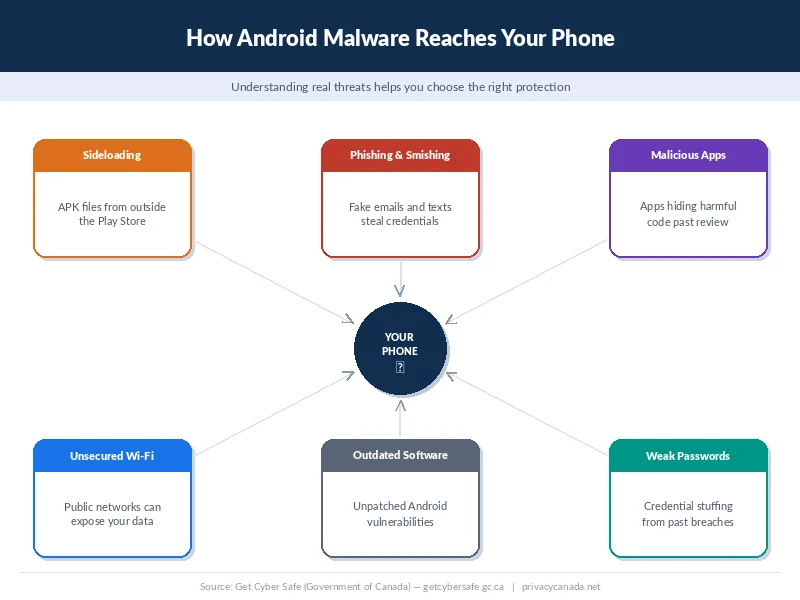
Before picking an app, it helps to understand the real risks, because some common beliefs about Android are simply wrong. Malware rarely appears out of nowhere. It almost always arrives because something was installed, tapped, or granted permission it should not have had.
Sideloading and third-party app stores
The single biggest risk factor is installing apps from outside the Google Play Store. Apps on the official store pass through Google’s review and Play Protect scanning. Apps downloaded as APK files from websites or alternative stores skip that check. The Government of Canada’s Get Cyber Safe program advises downloading only from trusted sources such as Google Play and researching an app before installing it. If you never sideload, your risk drops dramatically.
Phishing, smishing, and malicious links
Many mobile attacks do not involve a traditional virus at all. They rely on tricking you. Phishing emails, smishing text messages, and fake login pages try to harvest your passwords and payment details directly. Get Cyber Safe recommends never responding to unexpected messages from unknown numbers and thinking twice before tapping links or opening attachments. A good antivirus app helps here by filtering known scam links, but your own caution does most of the work.
Why “open source” is not the real risk
You will often read that Android is “more vulnerable because it is open source.” That claim is misleading and worth correcting. Openness is not what drives Android malware. The real factors are the ability to sideload apps, the existence of unvetted third-party stores, and the fact that many phones stop receiving security updates while people keep using them for years. Market share matters too, since attackers target the most popular platform. The core of Android, the Linux kernel, benefits from open code that many researchers inspect. The takeaway is practical: keep your phone updated, stick to the Play Store, and review permissions, and you remove most of the actual risk.
What’s the Best Antivirus for Android Devices?
Antivirus apps are made to protect you against any online threat. However, not all of them offer the same quality or number of features. The best antivirus for Android will protect against malware, phishing scams, unsecured Wi-Fi networks, identity theft, and will include a VPN for Android for added security.
Bitdefender Mobile Security: best overall

Bitdefender is our top pick for most Canadians who want a dedicated app. It combines top-tier protection scores with a light footprint and a cleaner privacy reputation than some better-known rivals.
Protection and performance
In AV-TEST’s September 2026 Android round, Bitdefender Mobile Security earned a perfect 6 out of 6 for protection, 6 for performance, and 6 for usability, for the maximum 18 points and a Certified seal. The protection score means it caught essentially all of the malware samples thrown at it. The performance score reflects low impact on battery and speed, which matters on a phone you use all day. This is not a one-time result. Bitdefender has posted consistently strong scores across AV-TEST’s bi-monthly rounds.
Features and privacy
The app pairs real-time malware scanning with web protection that blocks fraudulent and phishing pages, an account privacy feature that checks whether your email appears in known data breaches, and anti-theft tools to locate, lock, or wipe a lost device. A limited VPN is bundled, with unlimited VPN traffic available on higher tiers. Bitdefender runs much of its scanning in the cloud, which keeps the on-device app light. The company has not been subject to the kind of data-selling enforcement action that has affected some competitors, which is part of why it tops our list on a privacy-focused site.
Who it suits
Bitdefender suits anyone who wants strong, proven protection without a heavy battery cost, and who values a vendor with a clean privacy record. If you only want one app and do not want to think hard about the choice, this is the safe default.
Norton 360: best feature set
Norton is the pick if you want a security suite rather than a simple scanner. It bundles the widest set of extras, which can replace several separate subscriptions.
Protection and performance
Norton 360 scored a perfect 6 for protection, 6 for performance, and 6 for usability in AV-TEST’s September 2026 Android testing, earning the Certified seal with the full 18 points. Protection is on par with the best in the category, and the performance score indicates the heavier feature set does not drag the phone down in normal use.
Features and privacy
Norton’s appeal is breadth. The app includes a full, unlimited VPN on most plans, dark-web monitoring that alerts you if your personal information surfaces in breach data, scam-link and phishing protection for texts and browsing, Wi-Fi security alerts, and an app advisor that flags privacy-invasive apps before you install them. Norton is a long-established name in consumer security, and its privacy policy and data handling are disclosed in detail. The tradeoff is that the full feature set sits behind an annual subscription after the trial period.
Who it suits
Norton fits people who would otherwise pay separately for a VPN, breach monitoring, and antivirus. If you want those bundled and managed in one app, Norton offers strong value despite the subscription.
Avast and McAfee: strong alternatives
Two more apps scored at the top of AV-TEST’s September 2026 round and are worth considering, with one important caveat on Avast that a privacy-focused reader deserves to know.
Avast Antivirus and Security, and the FTC disclosure

Avast Antivirus and Security, and the FTC disclosure
Avast Antivirus and Security earned a perfect 6 for protection, 6 for performance, and 6 for usability in the September 2026 AV-TEST Android round, and its free tier is one of the more capable in the category. On pure detection, it is excellent.
Here is the caveat. In February 2024, the United States Federal Trade Commission announced a settlement requiring Avast to pay US$16.5 million and banned it from selling browsing data for advertising. The FTC found that Avast, through its Jumpshot subsidiary, collected consumers’ browsing information through its antivirus software and browser extensions and sold it to third parties, after marketing its products as tools that would protect privacy and block tracking.
The company has since been required to delete that data and the models built from it, and to implement a privacy program. Avast’s detection today is genuinely strong, but if your reason for installing a security app is privacy, you are entitled to weigh this history. We would point most privacy-minded readers to Bitdefender or Norton first.
McAfee Mobile Security

McAfee Mobile Security also scored a perfect 18 points (6 protection, 6 performance, 6 usability) in the September 2026 AV-TEST Android round. It offers a secure VPN, safe-browsing and scam protection, Wi-Fi scanning, and identity-monitoring features, with the fuller toolkit on paid plans. It is a capable all-rounder and a reasonable alternative to Norton if you prefer its interface or find a better price.
A note on free versions
Free tiers from reputable vendors can be a sensible choice, especially alongside Google Play Protect. Just read what you are agreeing to. Free security apps are sometimes monetized through data collection or heavy upsell prompts, which is exactly the pattern the FTC penalized Avast for. Before installing any free app, check the developer’s privacy policy, as the Office of the Privacy Commissioner of Canada advises, and confirm the permissions it requests match what it actually needs to do.
Privacy and your data: what Canadian law expects
A security app sees a lot. It can scan your files, inspect your network traffic, and read the links you tap. That makes the vendor’s data practices part of your security, not separate from it. Canadian privacy law and guidance set useful expectations here.
PIPEDA, consent, and app permissions
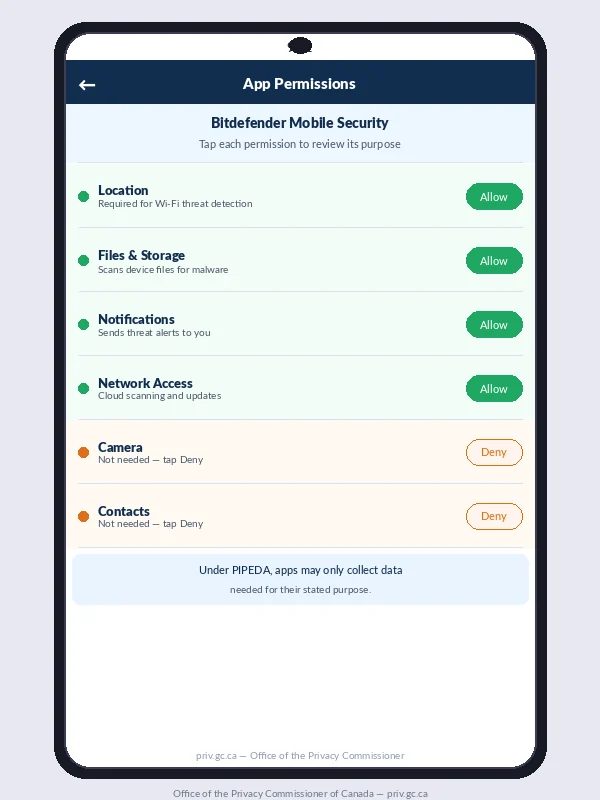
In the private sector, the Personal Information Protection and Electronic Documents Act, known as PIPEDA, governs how companies collect, use, and disclose your personal information, including through mobile apps. The principle that matters most for you is meaningful consent: an app should tell you what it collects and why, and you should be able to understand that before you agree. If a flashlight app wants your contacts, or a security app wants data unrelated to protecting your device, that is a red flag.
Office of the Privacy Commissioner guidance
The Office of the Privacy Commissioner of Canada publishes plain-language guidance on protecting your information when using mobile apps. Its advice is concrete: download only from official and trusted app stores, read the privacy policy before installing, check that requested permissions match what the app reasonably needs, turn on your device lock, and remove apps you no longer use. These steps cost nothing and prevent more harm than any single app.
Reading an app’s privacy policy before you install
On the Google Play Store, every app has a Data Safety section that summarizes what it collects and shares. Read it. Pair it with the developer’s full privacy policy. If you cannot find a privacy policy at all, treat that as a reason not to install. This habit is the single most useful privacy skill for mobile, and it applies as much to security apps as to games.
How to set up and run antivirus on Android
Modern Android handles security differently than it did even a few years ago, so the old “download an app and grant it everything” advice is out of date. Here is the current, sensible sequence.
Check Google Play Protect first
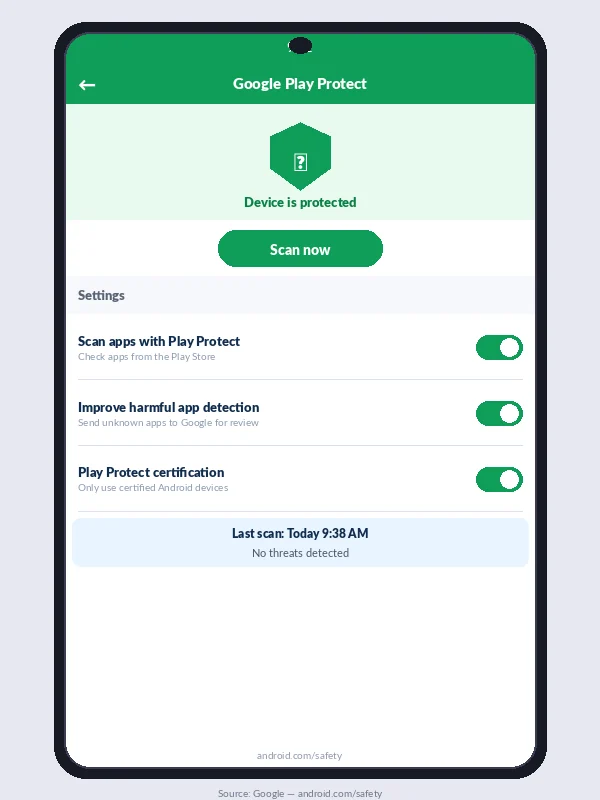
Before installing anything, confirm your built-in protection is active. Open the Google Play Store app, tap your profile icon at the top right, then tap Play Protect. From there you can run a scan and open Settings to confirm that “Scan apps with Play Protect” is turned on. It is enabled by default, but it is worth checking. For many people, this plus good habits is enough.
Install from the Google Play Store and review permissions
If you decide you want a dedicated app, install it from the Google Play Store so it passes Google’s review and scanning. During and after setup, review the permissions it requests. On current Android versions you can grant location access only while using the app, or grant one-time access, and the system automatically resets permissions for apps you have not opened in a while. Grant only what the app genuinely needs. A security scanner needs broad access to do its job, but you should still understand what you are approving.
Run your first scan and schedule updates
After installing, run a full scan so the app can establish a baseline. Then make sure both the app and your Android operating system are set to update automatically. Out-of-date software is one of the most common ways attackers get in, so automatic updates are one of the highest-value settings on your phone. Finally, enable a screen lock and biometric unlock if you have not already, since physical access to an unlocked phone defeats any antivirus app.
A few habits that matter more than any app
A few habits that matter more than any app
No app replaces the basics. Keep your phone updated. Install only from the Google Play Store unless you have a clear reason not to. Use a unique passcode and biometric lock. Be skeptical of unexpected messages and links, whether they arrive by email, text, or messaging app. Consider a password manager so a single breach does not unlock every account, and test your password strength if you are unsure.
On untrusted networks, remember the risks of public Wi-Fi and consider a reputable VPN for Android. For a broader walk-through, our online privacy guide covers the rest. If malware does slip through, a dedicated malware scanner can help remove it, and iPhone users can see our best antivirus for iPhone guide for the equivalent advice on iOS.
Best antivirus for Android FAQs
What is the best antivirus for Android?
Bitdefender Mobile Security is our top pick. It earned a perfect 18 out of 18 in AV-TEST’s September 2026 Android testing, runs light on battery, and comes from a vendor with a clean privacy record. Norton 360 is the best choice if you want a bundled VPN and dark-web monitoring in one subscription.
Do I really need an antivirus app on Android?
Not always. Every phone with Google Play services already runs Google Play Protect, which scans apps automatically. A third-party app adds value if you want anti-theft tools, scam-link filtering, breach monitoring, or a VPN, or if you install apps from outside the Google Play Store. Good habits still prevent most threats.
Is Google Play Protect enough on its own?
For cautious users who only install from the Play Store, it is a solid baseline. In AV-TEST’s September 2026 round it scored 5.5 of 6 for protection, slightly behind the dedicated apps that scored 6. If you want that extra margin or the additional features, a reputable paid app is worth it.
Are free Android antivirus apps safe to use?
Reputable free tiers can be fine, especially alongside Play Protect. The risk is that some free apps monetize your data. In 2024 the FTC penalized Avast US$16.5 million for selling browsing data. Always read the Google Play Data Safety section and the developer’s privacy policy before installing any free security app.
Does antivirus drain my Android battery?
Modern apps are designed to be light. In AV-TEST’s September 2026 testing, Bitdefender, Norton, Avast, and McAfee all scored the maximum 6 out of 6 for performance, meaning minimal impact on speed and battery. Cloud-based scanning, which Bitdefender uses heavily, keeps the on-device load low.
Is it safe to install apps from outside the Google Play Store?
It is riskier. Apps on the Play Store pass Google’s review and Play Protect scanning, while sideloaded APK files skip that check. Get Cyber Safe advises sticking to trusted sources. If you must sideload, a dedicated antivirus app and extra caution become much more important.
How is Android malware different from a computer virus?
Most Android threats are not classic self-replicating viruses. They are malicious or deceptive apps, phishing and smishing messages, and fake pages designed to steal credentials. That is why permissions, app sources, and link caution matter as much as traditional scanning on mobile.
Will an antivirus app protect me from phishing texts?
Partly. Many apps filter known scam and phishing links in your browser and messages, which helps. But no filter catches everything, so your own caution is the main defense. Never tap links or enter credentials from unexpected messages, even if they appear to come from your bank or carrier.
Does antivirus protect my privacy, or just block malware?
They are related but not the same. Antivirus blocks malicious software, while privacy depends on how apps and vendors handle your data. Under Canada’s PIPEDA, companies must obtain meaningful consent for collecting your information. Choose a security vendor whose own data practices you trust, not only one with high detection scores.
How often should I scan my Android phone?
Reputable apps scan continuously in the background and check each new app at install, so manual scans are rarely needed. Run a full scan after installing the app and if you notice unusual behavior such as rapid battery drain, overheating, or unexpected pop-ups. Keeping the app and Android itself updated matters more than frequent manual scans.
Sources
- AV-TEST, Android test results, September 2026: https://www.av-test.org/en/antivirus/mobile-devices/ (accessed 2026-11-24)
- Google, Android Safety and Security: https://www.android.com/safety/ (accessed 2026-11-27)
- Office of the Privacy Commissioner of Canada, Your privacy and mobile apps: https://www.priv.gc.ca/en/privacy-topics/technology/mobile-and-digital-devices/mobile-apps/apps_info_201405/ (accessed 2026-11-24)
- Office of the Privacy Commissioner of Canada, Mobile apps: https://www.priv.gc.ca/en/privacy-topics/technology/mobile-and-digital-devices/mobile-apps/ (accessed 2026-11-24)
- Get Cyber Safe (Government of Canada), Phones and tablets: https://www.getcybersafe.gc.ca/en/secure-your-devices/phones-and-tablets (accessed 2026-11-24)
- U.S. Federal Trade Commission, Press Releases February 2024: https://www.ftc.gov/news-events/news/press-releases/2024/02 (accessed 2026-11-27)