Privacy Canada is community-supported. We may earn a commission when make a purchase through one of our links. Learn more.
1Password Review: The Canadian-Built Password Manager Worth Paying For




Password Review Summary for Canadian Users
This 1Password review is written for Canadians who want one trustworthy place to keep every password. Credential theft is not a rare problem. According to Verizon’s 2025 Data Breach Investigations Report, “The use of compromised credentials was an initial access vector in 22% of the breaches reviewed in the 2025 DBIR.”
Privacy Canada earns affiliate commissions when you buy through some links on this page, but those commissions never affect the opinions in this review.
Our verdict is simple. 1Password is our top pick for Canadians who want a polished, secure everyday password manager, and it suits families and less-technical users best.
We chose it after weighing it against other options in this category (see Alternatives Considered), not in isolation. Ready to try it? Get 1Password.
What Is 1Password?
1Password is a password manager, which is an encrypted vault that stores your logins, cards, and secure notes behind one account password. 1Password fills those details into apps and websites, shares items securely, and warns you about breaches through a feature called Watchtower. If the category is new to you, start with our password manager guide for Canadians.
AgileBits Inc. makes 1Password. The company is headquartered at 4711 Yonge St, Toronto, Ontario, which makes 1Password one of the few major password managers built by a Canadian company. 1Password says it is trusted by millions of families and more than 200,000 businesses.
This 1Password review focuses on what matters to Canadians: jurisdiction, logging, and transparency, not marketing hype
Key 1Password Features Canadians Should Know
1Password uses AES-256 (AES-GCM) end-to-end encryption to protect your vault. Your data is scrambled on your device before it reaches a server. That means a Canadian user keeps control of the only keys that matter.
1Password secures your account with a two-layer design: your account password plus a 34-character Secret Key. Because both are required to decrypt data, a stolen password alone is not enough to open your vault. This matters if you worry about phishing, which remains a common way Canadian accounts get compromised.
1Password includes Watchtower, which scans your saved items for weak, reused, or breached passwords. Watchtower then tells you exactly which logins to fix first. It also flags accounts that support two-factor authentication but do not have it switched on yet.
1Password offers Travel Mode, which removes selected vaults from your devices until you turn it back on. This is genuinely useful for Canadians crossing the border, since a CBSA officer cannot inspect data that is not on the device.
1Password supports secure password sharing, even with people who do not use the app. Families can pass a streaming or banking login to each other without texting it in plain view.
1Password runs on macOS, iOS, watchOS, Windows, Android, and Linux, plus every major browser. This wide coverage keeps mixed-device Canadian households in sync.
1Password ships a built-in strong password generator that creates long, random passwords for every account. You never have to reuse a password again.
1Password Pricing and Plans
1Password Individual costs $2.99/month on a current promotional discount for new customers, down from a regular $3.99/month, paid annually. At the regular rate, that works out to $47.88 per year ($3.99 x 12).
1Password Families costs $4.49/month on the same promotional discount, down from a regular $5.99/month, for up to 5 members, paid annually. At the regular rate, that is $71.88 per year ($5.99 x 12), which makes Families the best value for most households.
All prices here are shown in USD, and 1Password gives you a 14-day free trial with no free tier.
1Password’s checkout offers a CAD toggle. A live CAD figure could not be confirmed, so we quote USD only and never estimate a conversion.
For comparison, Bitwarden Premium is $1.65/month USD (billed annually at $19.80/year) and keeps a genuine free tier. LastPass bills annually with a current new-customer discount, and its free plan is limited to one device type. Dashlane bills annually, bundles a VPN, and discontinued its free plan in September 2025.
Ready to start? Get 1Password
Features and Functions

What We Like About 1Password
- 1Password is built by a Canadian company, so your provider answers to local accountability and offers a data-region choice.
- 1Password uses a Secret Key, so a stolen server database alone cannot unlock your vault or expose your data.
- 1Password has no known breach of encrypted vault data in roughly 20 years of operation.
- 1Password offers Travel Mode, which removes chosen vaults before you cross the border and face CBSA inspection.
- 1Password ships polished, consistent apps on every platform, so less-technical family members rarely get stuck.
- 1Password runs Watchtower, which flags reused, weak, and breached passwords so you fix the risky ones fast.
- 1Password enables secure sharing, so families hand off logins to each other without exposing them in plain text.
Where 1Password Falls Short
- 1Password has no free tier, so budget-focused users should start with Bitwarden’s genuine free plan instead.
- 1Password displays prices in USD by default, and we could not confirm a live CAD checkout figure.
- 1Password does not bundle a VPN, unlike Dashlane, though a dedicated VPN is usually the better choice anyway.
- 1Password adds a Secret Key step at setup that some new users find a little fiddly.
1Password vs Bitwarden, LastPass, and Dashlane
We compared 1Password against three well-known rivals. Each table uses the same columns so you can scan them quickly. We focus on price, jurisdiction, and track record, which matter most to Canadian readers.
1Password vs Bitwarden
| Password Manager | Price | Speed/Performance | Features | Support | Best for |
|---|---|---|---|---|---|
| 1Password | $2.99/mo USD promo (regular $3.99/mo), billed annually | Fast, polished apps on every platform | Vault, autofill, Watchtower, Travel Mode, sharing | Email and detailed docs | Families and less-technical Canadians |
| Bitwarden | $1.65/mo USD Premium, billed annually; free tier | Lightweight and responsive | Open-source vault, core features, free plan | Email and community | Budget-conscious, technical users |
1Password wins on polish, usability, and Travel Mode. Bitwarden wins on price and its free tier, so budget-focused Canadians may prefer it.
1Password vs LastPass
| Password Manager | Price | Speed/Performance | Features | Support | Best for |
|---|---|---|---|---|---|
| 1Password | $2.99/mo USD promo (regular $3.99/mo), billed annually | Fast, polished apps on every platform | Vault, autofill, Watchtower, Travel Mode, sharing | Email and detailed docs | Families and less-technical Canadians |
| LastPass | Billed annually with a new-customer discount; free plan limited to one device type | Web-first, generally responsive | Vault, autofill, sharing | Email and knowledge base | Existing users staying on the platform |
LastPass carries a concrete trust gap. Its 2022 data breach exposed customer vaults. According to Bloomberg Law, “LastPass USA LLP will pay up to nearly $24.5 million to settle a proposed class action over a 2022 data breach.” Read our LastPass review for the full picture.
1Password vs Dashlane
| Password Manager | Price | Speed/Performance | Features | Support | Best for |
|---|---|---|---|---|---|
| 1Password | $2.99/mo USD promo (regular $3.99/mo), billed annually | Fast, polished apps on every platform | Vault, autofill, Watchtower, Travel Mode, sharing | Email and detailed docs | Families and less-technical Canadians |
| Dashlane | Billed annually; no free plan since Sept 2025 | Responsive, browser-first | Vault, autofill, bundled VPN | Email and help center | Users who want a manager plus VPN |
Dashlane’s edge is its bundled VPN. But Dashlane dropped its free plan in September 2025 and generally costs more, so 1Password stays our pick for value and trust.
Other Password Managers We Considered
Beyond the three rivals above, we weighed a few more options, which you can explore in our best password managers roundup.
- Keeper offers strong security but skews pricier and more business-oriented than most Canadian households need.
- NordPass is good value and improving quickly, but it has a shorter public audit track record than 1Password.
- KeePass is free and open-source, yet its steep learning curve and lack of polished cloud sync hold it back.
1Password Security and Privacy
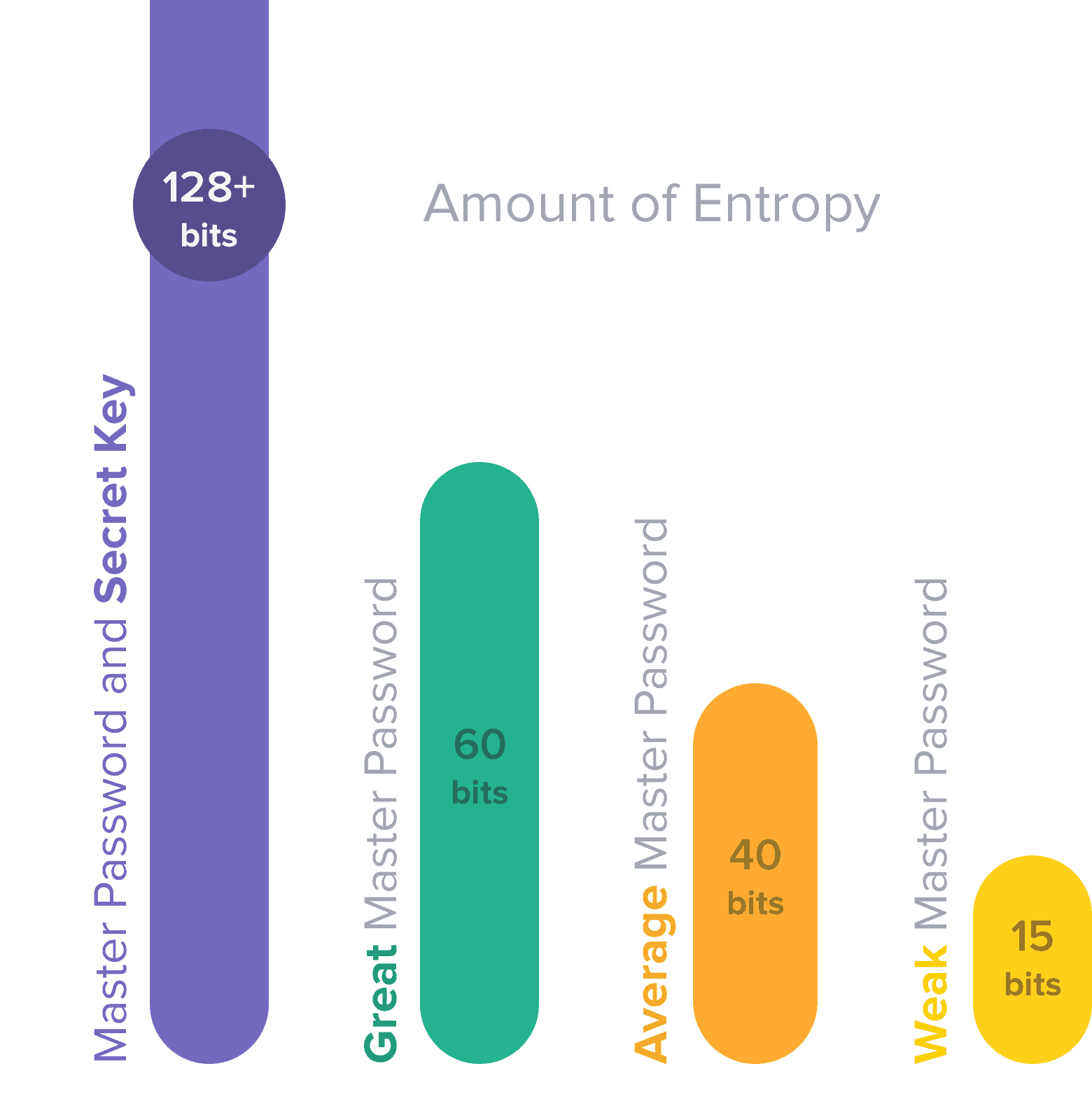
1Password uses AES-256 encryption to protect your vault, the same standard trusted for sensitive data worldwide; here is how AES-256 encryption works. 1Password pairs your account password with a 34-character Secret Key, so decryption needs both. 1Password uses Secure Remote Password to verify you without sending your password over the network.
1Password follows a zero-knowledge model, which means only you can decrypt your vault and 1Password cannot read its contents. Because AgileBits is based in Toronto, 1Password operates under Canadian law, which appeals to readers who prefer local accountability. That jurisdiction is one of the first things we check when we evaluate any privacy tool.
In 2023, 1Password detected suspicious activity tied to an Okta support breach but reported that no user vault data was compromised. The company published a public timeline of the event, which we read as healthy transparency.
1Password has been independently audited by third-party security experts on a recurring basis. For an added layer, set up two-factor authentication on your account.
Who Should Use 1Password
1Password is best for families, less-technical users, Apple households, and Canadians who cross the border often. It also suits multi-device households and anyone migrating off LastPass.
We judge every product the same way, weighing jurisdiction, logging, and transparency. For 1Password, that means AgileBits’ Toronto base and a zero-knowledge design; here is how we test security tools.
1Password is not the best fit for strict-budget users, who should look at Bitwarden’s free tier. It is also not ideal if you want a bundled VPN, where Dashlane has the edge. If you simply want a place to store passwords for one device at no cost, a free plan elsewhere may serve you better.
How to Get Started With 1Password
Setup takes about ten minutes. These steps use the settings we recommend for Canadian households.
- Start the 14-day free trial and choose the Individual or Families plan.
- Set a strong, unique account password, then save your Secret Key and print the Emergency Kit.
- Install the apps and browser extension, then import your logins from your old manager.
- Turn on two-factor authentication and Watchtower, and enable Travel Mode before any border crossing.
How do You Use 1Password?
In order to use iPassword with your browser, you must have administrative rights on that computer or device. This may be inconvenient for those who work in multi-user environments that my not provide admin privileges to everyone.
Installation and Account Setup
Start the process by going to their website and setting up an account. Once that’s done, you’ll receive a link to verify your email address and a .pdf file containing your Secret Key master password and a QR code to scan in new apps and accounts to add to your vault. Then, you’ll return to their website, download the app or browser extension, install it, and sign-in to your account.

You’ll have to repeat this process for every app, device, and OS you use. Once that’s all done, simply browse the internet and go about your business. Each time you login to a new account or app, you’ll get a prompt to save your password. This is the best way to store passwords for accounts you use daily. You can also go down a list of all the accounts, devices, and apps that require password access and enter them into your vault all at once, but this is tedious and time-consuming.
You also have an auto-fill option and an opportunity to have iPassword create and store unique passwords for you. It’s a good idea to do this with all passwords when you first begin using the app; it will be performed automatically when you create new accounts and add devices.
In the beginning, iPassword stores everything in the virtual vault, but you can opt to store them locally when you switch from the free trial to a paid account.
Customer Support
Their customer support is fast, friendly, and responsive. The main support page contains information and tutorials to cover every supported device and OS. You can also contact customer support directly on their 24/7 forum, through the form on their contact page, or by reaching out to the company on their Twitter feed.
Customer care can help you out with:
- Billing issues
- Installation help
- Glitches
- Refunds and cancellations
Final Verdict: Our 1Password Review Rating
This 1Password review scores it 4.5 out of 5. In our scoring, 1Password is the most polished and trustworthy everyday manager in this comparison, and a rare option built in Canada.
1Password is best for families and less-technical Canadians who value ease and security over the lowest possible price. If that sounds like you, Get 1Password.
1Password Review FAQs
Q: Is 1Password legal in Canada?
A: Yes, 1Password is fully legal to use in Canada. Storing your own passwords in an encrypted vault aligns with the data-protection goals of Canada’s PIPEDA privacy law.
Q: Do I really need a password manager?
Yes, most people do. Reused and stolen credentials are a leading cause of account breaches, and a manager gives every account a strong, unique password.
Q: How does 1Password compare to Bitwarden?
A: 1Password wins on polish, ease of use, and Travel Mode, while Bitwarden wins on price and its genuine free tier.
Q: Are there free alternatives?
A: Yes, Bitwarden offers a genuine free tier and KeePass is free and open-source, though both ask for more technical comfort than 1Password.